
Oracle Flex Clusters


Oracle Flex Clusters
From Oracle Grid Infrastructure 12c Release 2 (12.2) onward, all cluster configurations are implemented as Oracle Flex Clusters. When you install Oracle Grid Infrastructure in a Flex Cluster configuration, you create an adaptable, resilient, and expandable network of interconnected servers. This architecture serves two primary purposes: it provides an environment for Oracle Real Application Clusters (RAC) databases with extensive node counts to enable massive parallel query processing, and it supports various service deployments that need coordinated automation for high availability. Every node within an Oracle Flex Cluster operates as part of a unified Grid Infrastructure cluster, which centralizes resource deployment decisions based on application requirements while accounting for different service levels, workload variations, failure scenarios, and recovery procedures. All nodes maintain tight interconnectivity and have direct pathways to shared storage.
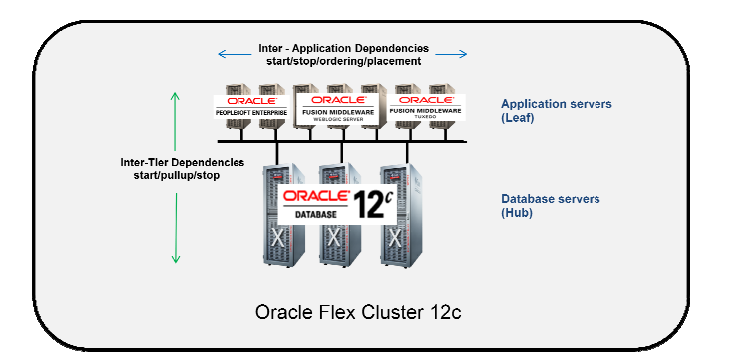
HUB Node in Flex Cluster
- A hube node is same as pre 12 cluster node. Each hub node are tightly connected to each other via private interconnect and form the cluster
- A hub node hosts database and ASM instances
- Each hub node access the shared storage
- It mounts the shared storage,
- It is attached to the cluster interconnect,
LEAF Node in Flex Cluster
- Leaf nodes are loosely connected with the cluster.
- Each leaf node is connected to the hub node and therefore connected to cluster via hub node only
- Leaf nodes are not connected to each other
- A leaf node does not mount the shared strage, and therefore it cannot run ASM or a database instance.
- All Leaf Nodes are on the same public and private network as the Hub Nodes
- Leaf Nodes can failover to a different node if the Leaf Node fails.
- Leaf Nodes can host different types of applications e.g. Fusion Middleware, EBS, IDM, etc. The applications on
- It is however attached to the interconnect and is part of the cluster.
- It does run Grid Infrastructure.
Oracle Flex ASM Clusters Networks
Within Oracle Grid Infrastructure, Oracle ASM is deployed as part of an Oracle Flex Cluster installation to deliver storage services. Oracle Flex ASM introduces the capability for an ASM instance to operate on a physically separate server from the database servers themselves. Multiple ASM instances can be grouped together in a cluster to serve numerous database clients, with each Flex ASM cluster having its own enterprise-wide unique identifier.
This architecture enables you to consolidate all storage needs into a unified set of disk groups, all managed by a compact collection of ASM instances running within a single Flex Cluster. Every Flex ASM cluster contains one or more nodes where ASM instances are actively running. For network connectivity, Flex ASM can either share the same private networks used by Oracle Clusterware or utilize its own dedicated private networks. Each network interface can be designated as PUBLIC, ASM & PRIVATE, PRIVATE, or ASM. The ASM network can be established during the initial installation or configured and modified after installation is complete.
Oracle Flex ASM Cluster Node Configuration
Nodes within an Oracle Flex ASM cluster exhibit several defining characteristics. They function similarly to cluster member nodes from previous releases, with all servers configured in the cluster node role operating as equals. These nodes maintain direct connections to ASM disks and run a Direct ASM client process. They respond to service requests delegated through the global ASM listener configured for the Flex ASM cluster, which designates three of the cluster member node listeners as remote listeners for the entire Flex ASM cluster. Additionally, these nodes can provide database clients running on ASM cluster nodes with remote access to ASM for metadata operations, while allowing those clients to perform block I/O operations directly to ASM disks. Both the hosts running the ASM server and the remote database clients must be cluster nodes.
General Requirements for Oracle Flex Cluster Configuration
Network Requirements
All public network addresses within an Oracle Flex Cluster, whether assigned manually or automatically, must reside within the same subnet range. Furthermore, all cluster addresses must be either static IP addresses, DHCP-assigned addresses (for IPv4), or autoconfiguration addresses from an autoconfiguration service (for IPv6), all of which must be registered in the cluster through GNS.
DHCP-Assigned Virtual IP Addresses
Every cluster node requires a configured VIP name. For DHCP-assigned VIPs during installation, you have one option: select “Configure nodes Virtual IPs assigned by the Dynamic Networks” to let the installer automatically generate names for VIP addresses obtained through DHCP. These addresses are assigned via DHCP and resolved through GNS. Oracle Clusterware transmits DHCP requests using the client ID format nodename-vip without including a MAC address. You can verify DHCP address availability using the cluvfy comp dhcp command.
Manually-Assigned Addresses
For manually-assigned VIP configurations during installation, you must set up cluster node VIP names for all nodes using one of two approaches. The first is manual entry, where you individually provide the host name and virtual IP name for each node. These names must resolve to addresses configured on the DNS and must comply with RFC 952 standards, permitting alphanumeric characters and hyphens while disallowing underscores.
The second approach uses automatically assigned names through string variables. This method enables rapid assignment of numerous names during installation by using variables that correspond to pre-configured DNS addresses. These DNS addresses must have specific characteristics: a hostname prefix string used across addresses (such as “mycloud”), a numerical range with start and end values for cluster nodes (like 001 to 999), a node name suffix appended after the range number (such as “nd”), and a VIP name suffix added after the range number (such as “-vip”). Using alphanumeric strings, you can create addresses following patterns like mycloud001nd, mycloud046nd, mycloud046-vip, mycloud348nd, or mycloud784-vip.
How to identify a Leaf and Hub Node
$ crsctl get node role status -all

Node 'node1' active role is 'hub'

Node 'node2' active role is 'hub'
Change the role of a node HUB or LEAF in Flex cluster
CRSCTL is used to change the role of a node ( Role: Hub/leaf)
Following are the steps used to change the role of a node:
- Check the current role of the local node.
crsctl get node role config - Change the role of the local node:
crsctl set node role {hub | leaf} - Stop Oracle High Availability Services on the node where you change the role.
crsctl stop crs - If you are changing a Leaf Node to a Hub Node, then configure the Oracle ASM Filter Driver
$ORACLE_HOME/bin/asmcmd afd_configure